AI in Healthcare: Practical Use Cases for 2026
12 practical AI in healthcare use cases across scheduling, documentation, follow-up and billing, with maturity, risk and how to pick a first project.
TLDR
12 practical AI in healthcare use cases across scheduling, documentation, follow-up and billing, with maturity, risk and how to pick a first project.
- The most practical use cases sit in scheduling, intake, documentation, follow-up and billing.
- Clinical tools such as decision support and triage can help, but they carry more risk and need stronger oversight.
- Privacy, EHR integration and human review make healthcare AI harder to build than AI in most other industries.
- The best first project is a repetitive task with low clinical risk and a result the team can easily measure.
It's Monday morning at a busy family clinic. The phone lines opened at 8 a.m., and twelve calls are already waiting. Three patients filled out the same intake form twice. One of the doctors is still finishing last Friday's notes.
None of these problems involve medicine directly. Yet they take hours away from patient care every week, and they repeat at almost every clinic and hospital.
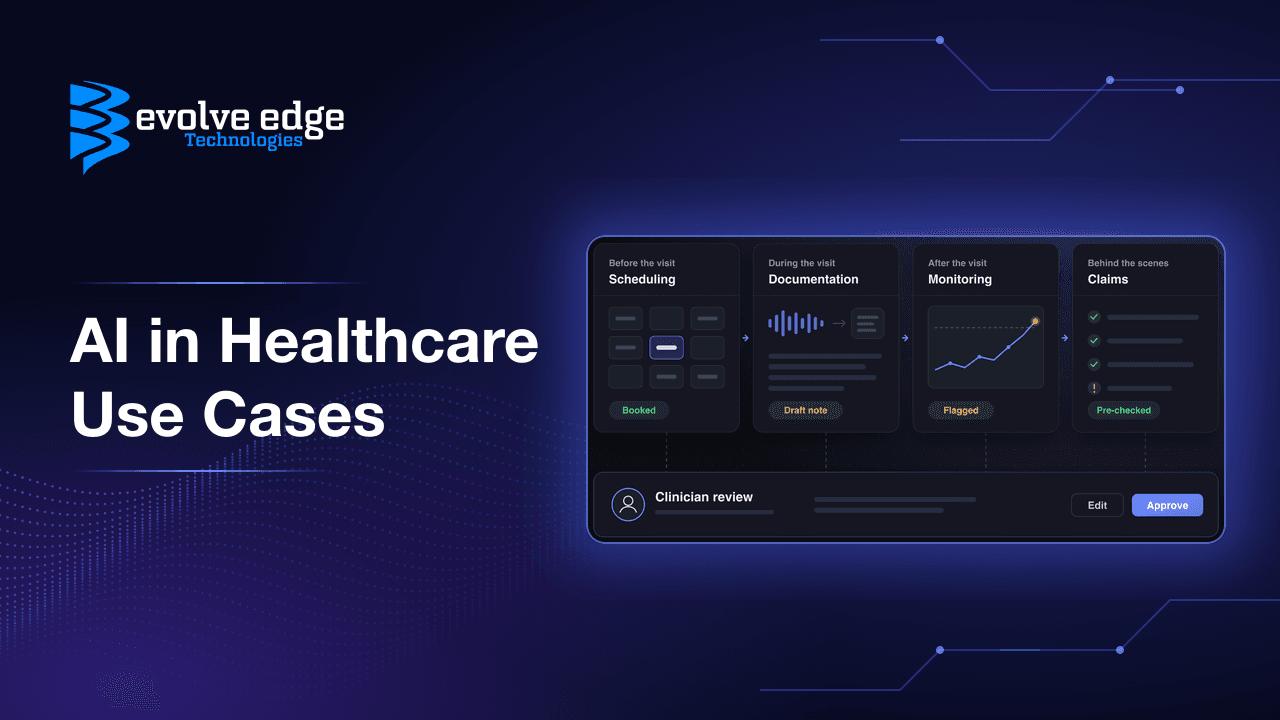
This is where AI in healthcare is proving most useful right now. This guide walks through 12 practical use cases in the order a patient moves through care: before the visit, during it, after it, and behind the scenes. It also covers how mature each one is, what makes healthcare AI harder to build, and how to choose a starting point.
What Is AI in Healthcare?
AI in healthcare is the use of machine learning, language models and voice systems to support clinical and administrative work. It can read records, understand speech, sort data, draft documents and complete routine tasks inside a provider's systems.
Older healthcare software followed fixed rules. A phone menu sent callers down a set path, and a form accepted only exact answers. Modern AI can handle requests in plain language and connect to the systems behind them.
A simple example shows the difference. A patient wants to move an appointment:
Older system: Call → phone menu → hold → front desk → manual calendar check → callback
AI-supported system: Call or text → AI understands the request → checks open slots → rebooks → sends confirmation
The goal is to take repetitive work off staff so they can focus on patients. In most healthcare settings, AI suggests and drafts while a person reviews and decides. That balance matters more in healthcare than almost anywhere else, which is why many teams look for healthcare AI development services with clinical oversight built into the design.
Before the Visit
Much of the friction in healthcare happens before a patient sees anyone. Calls go unanswered, forms get repeated, and insurance problems show up at the front desk. AI at this stage helps patients get to the right appointment with fewer handoffs.
1. Appointment Scheduling and Reminders
Scheduling is one of the most common entry points for AI in healthcare. The work is repetitive, and the rules are usually clear.
An AI scheduling system can:
- Book, cancel and reschedule visits through chat, text or phone
- Follow booking rules, such as visit length or which provider sees new patients
- Send reminders and confirm attendance
- Offer a new time when a patient can't make it
- Fill cancelled slots from a waitlist
Missed appointments leave gaps that other patients could have used. Reminders that let patients reschedule in one reply can recover many of those slots. Phone-based scheduling usually relies on voice AI development services built for natural conversation.
2. AI Receptionists and Phone Agents
Front desk teams often handle calls, check-ins and walk-ins at the same time. Something gets missed.
Suppose a patient calls a dermatology clinic at 9 p.m. to ask about a rash and book a visit. An AI phone agent can answer, collect the patient's details, check the calendar and book the next open slot. If the patient mentions a fast-spreading rash with a fever, the agent stops booking and directs them to urgent care or an on-call line.
That handoff is the most important part of the design. A well-built agent knows which calls it should never handle alone, such as symptoms that sound urgent, medication questions or upset patients. Many clinics start with AI receptionists for clinics on after-hours lines, where the gap is obvious and the risk stays low. More examples across industries appear in this guide to voice AI use cases.
3. Patient Intake and Insurance Checks
Intake involves the same questions for every patient. AI can take most of that load:
- Pre-visit forms: Sent by text or email and filled in on a phone
- Document reading: Insurance cards and IDs read from a photo
- Eligibility checks: Coverage verified before the patient arrives
- EHR updates: Clean data written into the chart, so staff don't retype it
The result is a faster check-in and fewer claim problems later. A short staff review for new patients helps catch errors before they reach the chart.
4. Symptom Triage and Care Navigation
Triage tools ask patients about their symptoms and suggest the right level of care. That might be home care, a telehealth visit, urgent care or the emergency room. Navigation tools help patients find the right specialist or service inside a health system.
This use case carries more risk than scheduling, because a wrong answer can delay care. Strong triage tools follow approved clinical protocols, avoid giving diagnoses and escalate as soon as red-flag symptoms appear. These limits are usually enforced through AI guardrails that check every response before it reaches the patient.
During the Visit
In the exam room, every minute spent on a screen is a minute away from the patient. AI during the visit aims to give some of that time back without taking any decisions away from the clinician.
5. Ambient Clinical Documentation
Ambient documentation, often called an AI scribe, is the most widely adopted AI tool in medicine today.
With the patient's consent, the AI listens to the conversation between the patient and the clinician. It then drafts a structured clinical note. The clinician reviews it, makes changes and signs it.
Visit conversation → AI transcribes and structures it → draft note in the EHR → clinician reviews → note signed
Some tools also suggest billing codes, draft referral letters or write a plain-language visit summary for the patient.
The time savings are real but often smaller than vendors suggest. They also depend heavily on how often clinicians actually use the tool. Accuracy is the bigger concern. AI notes can leave out important details or include things that were never said. The clinician's review is the step that keeps the record safe, and it shouldn't be rushed. Techniques for reducing hallucinations in LLMs help, but they don't replace that check.
6. Clinical Decision Support
Decision support tools help clinicians find information faster during a visit. Common tasks include:
- Summarizing a long patient history before the appointment
- Pulling relevant guidance from clinical guidelines
- Flagging possible drug interactions
- Pointing out overdue screenings or tests
Trust depends on transparency. Clinicians are far more likely to rely on a tool that shows where each answer came from. A tool that gives confident answers without sources creates new risk. The clinician should always make the final call.
7. Medical Imaging Triage
Imaging is one of the oldest and most studied areas of healthcare AI. Models can detect signs of stroke, bleeding, lung nodules and fractures on scans.
In daily practice, the most common use is prioritization. The AI reviews incoming scans and moves likely urgent cases to the top of the radiologist's worklist. The radiologist still reads every image and makes the diagnosis. The difference is that a possible brain bleed gets seen first instead of waiting in line behind routine scans.
After the Visit
Recovery and long-term health often depend on what happens once the patient goes home. Instructions get forgotten, refills get skipped, and warning signs get missed. Care teams rarely have time to check on everyone personally.
8. Remote Patient Monitoring
Remote monitoring programs collect readings from home devices, such as blood pressure cuffs, glucose meters, pulse oximeters and scales. The challenge is volume. A care team can't review every reading from hundreds of patients each day.
AI sorts the data and surfaces what needs attention:
- Readings outside a safe range
- Slow trends moving in the wrong direction
- Patients who stopped sending data
The nurse starts the day with a short list of patients to call. Alert thresholds need careful tuning, though. When a system flags too much, staff start to tune it out.
9. Patient Follow-Up and Education
Patients often have questions after they leave. A follow-up assistant can handle the common ones at any hour:
"Can I take my new blood pressure pill with my other medications?"
"Is it normal for the stitches to itch?"
The safest assistants answer only from a clinic's approved materials, such as discharge instructions and care protocols. They usually rely on RAG systems to find the right document before writing a reply. Questions outside those materials, or anything that sounds urgent, go straight to a nurse.
10. Chronic Care and Care-Gap Outreach
Patients with long-term conditions often fall behind on routine care. A patient with diabetes might be overdue for an eye exam. Another might have stopped refilling a heart medication months ago.
AI can scan records to find these gaps across an entire patient list. It then sends a personal reminder by text, email or phone and offers to book the visit. For practices in value-based care, closing gaps affects both patient outcomes and quality scores. Progress is also easy to track, since teams can count gaps closed each month.
Behind the Scenes
Patients never see the billing office, but its work decides whether a practice gets paid. Revenue cycle tasks are rule-heavy, high in volume and easy to measure. That makes them a strong fit for AI agent workflow automation, where a task moves through several steps without someone pushing it along.
11. Medical Coding and Claims
Coding turns a clinical note into billing codes. It's detailed work, and small mistakes lead to denied or underpaid claims.
An AI coding assistant reads the signed note and suggests codes, along with the exact text that supports each one. A human coder reviews the suggestions and approves them.
Once the claim is ready, AI can check it before submission. It looks for missing fields, codes that don't match the documentation, and rules that vary by payer. Fixing a problem at this stage takes minutes. Fixing it after a denial can take weeks.
12. Prior Authorization and Denial Management
Prior authorization is one of the most time-consuming tasks in a practice. Staff have to check whether a service needs approval, gather records, fill out payer forms and follow up until a decision arrives.
AI can support each step:
- Check requirements: Confirm whether the payer needs approval for the order
- Gather evidence: Pull the relevant notes, labs and imaging from the chart
- Prepare the request: Fill in the payer's form with the right details
- Track status: Follow up and alert staff when a decision comes back
When claims do get denied, AI can sort denials by reason and payer, spot patterns and draft appeal letters from the patient's record. The patterns are often more valuable than the appeals. If one payer keeps rejecting the same procedure for the same reason, the fix usually belongs earlier in the process, during intake or documentation.
How Mature Is Each Use Case?
These 12 use cases are at different stages. Some are already standard in many organizations, while others are still mostly pilots. The table gives a quick view of where each one stands.
| Use case | Maturity | Time to value | Clinical risk |
|---|---|---|---|
| Appointment scheduling and reminders | Established | Fast | Low |
| AI receptionists and phone agents | Growing | Fast | Low |
| Patient intake and insurance checks | Established | Fast | Low |
| Symptom triage and care navigation | Growing | Medium | High |
| Ambient clinical documentation | Established | Medium | Medium |
| Clinical decision support | Growing | Slow | High |
| Medical imaging triage | Established | Medium | High |
| Remote patient monitoring | Growing | Medium | Medium |
| Patient follow-up and education | Growing | Medium | Medium |
| Chronic care and care-gap outreach | Growing | Medium | Low |
| Medical coding and claims | Established | Fast | Low |
| Prior authorization and denials | Growing | Medium | Low |
The pattern is clear. Administrative work with low clinical risk tends to deliver value fastest. Use cases that influence diagnosis or tell patients what to do need the most testing before launch.
Health plans run many of these workflows from the other side, especially claims review and prior authorization. That side of the industry is covered on the page for AI for insurance and payers.
What Makes Healthcare AI Harder to Build
A chatbot for an online store and a chatbot for a clinic can run on the same model. The clinic version still takes far more work to build safely.
| Challenge | Why it matters | How teams usually handle it |
|---|---|---|
| Patient privacy | Health data is highly sensitive and tightly regulated, including under HIPAA in the U.S. | Business associate agreements with vendors, encryption, access controls, audit logs and de-identified data during development |
| EHR integration | AI is only useful if it works inside the systems clinicians already use | Standard interfaces such as FHIR and HL7, plus custom work for older systems |
| Accuracy | A confident wrong answer can affect a patient's care | Grounded answers, visible sources and human review for anything clinical |
| Bias | A model can perform worse for groups it saw less often in training | Testing across different patient groups before and after launch |
| Consent and accountability | Patients and regulators expect to know how AI was used | Clear consent steps and a record of what the AI suggested and who approved it |
Integration is often the slowest part of a healthcare AI project. Each EHR works differently, and many organizations run older systems alongside newer ones. Planning for it early avoids long delays later. The general approach is covered in this guide to AI integration with existing systems.
Human review deserves the same early attention. If reviewing an AI output takes as long as doing the task by hand, staff will either skip the review or stop using the tool. Good design makes review quick by showing sources and highlighting the parts most likely to need a second look.
How to Choose the Right Healthcare AI Use Case
Many healthcare AI projects stall because the starting point was wrong. The technology worked, but the problem was too broad or too risky for a first project. A few questions help narrow the choice.
1. How Often Does the Task Happen?
A task that happens thousands of times a month gives AI room to make a difference. A task that happens twice a week rarely justifies the build.
2. What Happens if the AI Gets It Wrong?
A wrong appointment time costs a phone call to fix. A wrong medication answer can hurt someone. Early projects should sit on the low-risk end, where mistakes are easy to catch and correct.
3. Is the Data Ready?
AI needs reliable access to calendars, records or payer rules to do useful work. If that data is scattered or locked in an older system, integration may take longer than the AI itself. A short AI readiness assessment can reveal these gaps before any build starts.
4. Can It Run in Shadow Mode First?
In a shadow pilot, the AI works alongside staff for a few weeks, but its output isn't used yet. Staff compare its answers with their own. This shows where the system is reliable and where it breaks, with no risk to patients. Structured AI evals during this phase make the results easier to compare over time.
5. How Will Success Be Measured?
A clear baseline makes it easy to tell whether the project worked. Useful measures include minutes saved per clinician, no-show rate, after-hours calls answered, clean claim rate and days in accounts receivable.
After-hours calls, appointment reminders, insurance checks and claim reviews usually pass all five questions. That's why they are common first projects.
FAQs
Is AI in healthcare HIPAA compliant?
AI can be used in a HIPAA-compliant way, but no tool is compliant on its own. Compliance depends on how the system is built and operated. That includes business associate agreements with every vendor that touches patient data, encryption, access controls and audit logs.
Will AI replace doctors or nurses?
No. Today's tools take over specific tasks, such as drafting notes, answering routine questions and sorting data. Diagnosis and treatment decisions stay with clinicians. Most of the value so far comes from giving clinicians more time with patients.
Can AI work with existing EHR systems?
Yes, in most cases. Major EHRs support standard interfaces such as FHIR, and older systems can often be connected through integration engines. The effort varies a lot by system, so integration should be scoped early.
What is the easiest AI use case for a small clinic?
Appointment reminders and after-hours call handling are usually the simplest places to start. They need limited access to clinical data and carry low risk. Results such as fewer no-shows and fewer missed calls also show up quickly.
Should a clinic build or buy healthcare AI?
It depends on the workflow. Off-the-shelf tools work well for common tasks like ambient documentation. Custom builds make more sense when a workflow is specific to the organization or needs deep integration with internal systems.
Conclusion
AI in healthcare is often discussed in terms of breakthroughs in diagnosis. In practice, much of its current value comes from quieter work: answering calls, preparing notes, checking claims and keeping patients on track between visits.
The organizations getting the most from AI tend to start small. They pick one repetitive workflow, keep a person in the loop, measure the result and expand from there.
The better question is which task takes the most time away from patient care today, and whether AI can safely take it on.